
You have a REST API. Someone on your team, or a client, has asked whether you need an MCP server too, and whether that means rebuilding the API. The short answer is no. The longer answer is that MCP and REST solve different problems, and understanding the difference saves you from a rebuild you do not need.
This post covers the three MCP server architectures, how MCP is actually different from a REST API, whether your application still needs a REST API if you build an MCP server, and how one MCP server ends up usable from Claude, GPT, Gemini, and whatever agent framework your team picks next.
What is an MCP server, in plain terms?
MCP, the Model Context Protocol, is an open standard that defines how an LLM client (Claude Desktop, an IDE, a custom agent) discovers and calls tools exposed by a server. An MCP server is the piece of code that implements that standard. It tells any connected client three things: what tools exist, what inputs each tool takes, and what shape the response comes back in.
The model does not call your database or your API directly. It calls a tool the MCP server exposes, the server does the actual work (often by calling your existing API or database), and the result comes back to the model in a format it can reason over. The server is a translator and a gatekeeper, not a new backend.
What are the different types of MCP server architecture?
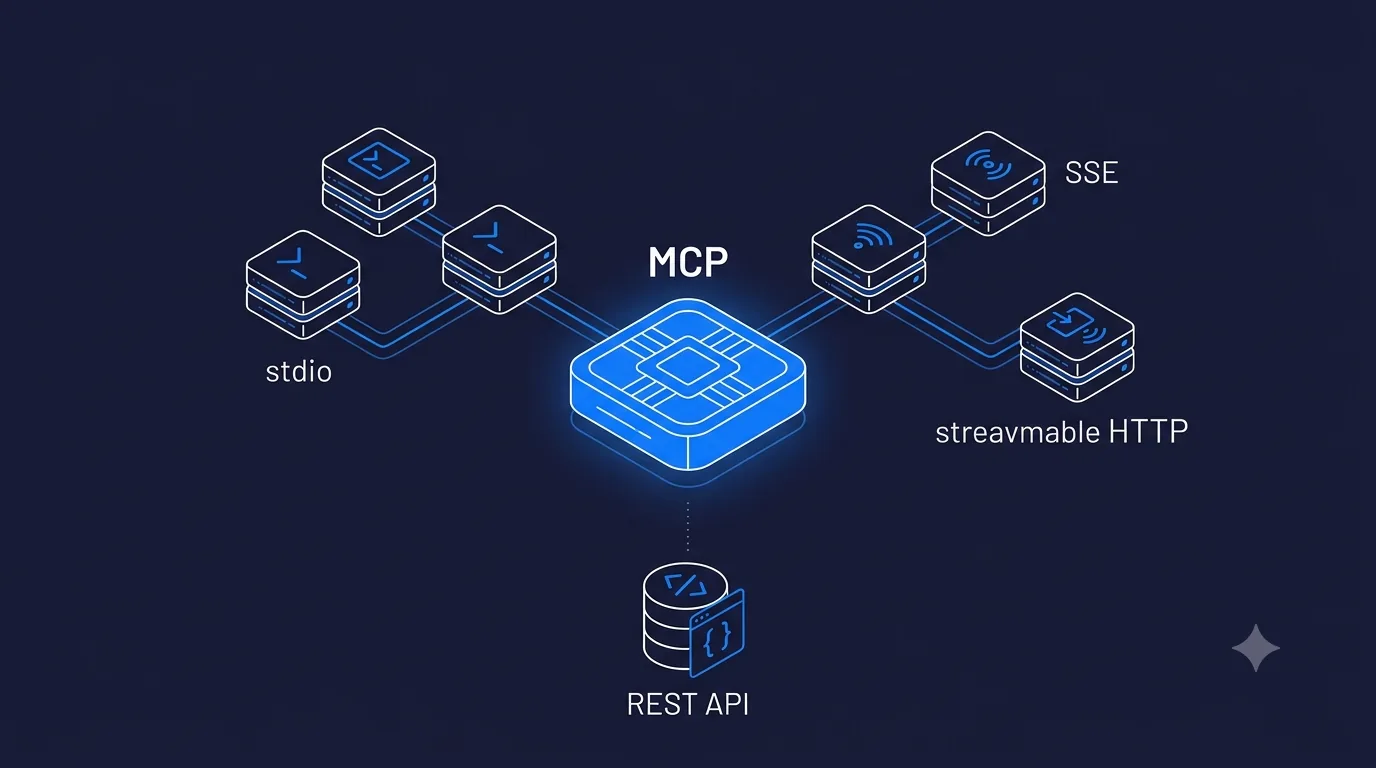
MCP servers fall into three architectural patterns based on transport, the mechanism used to move messages between client and server. Picking the wrong one is the most common early mistake teams make.
- Stdio (standard input/output). The server runs as a local process on the same machine as the client. Claude Desktop, for example, launches your MCP server as a subprocess and talks to it over stdin/stdout. No network, no auth layer needed beyond OS-level permissions. This is the right shape for developer tools, local file access, or anything that should never leave the user's machine.
- HTTP with SSE (Server-Sent Events). The server runs remotely and is reachable over HTTP. The client opens a persistent connection and the server streams events back over it, useful for long-running tool calls or when the model needs partial results as they arrive. This was the original pattern for hosted, multi-user MCP servers.
- Streamable HTTP. The newer transport in the spec, designed to replace SSE for most hosted use cases. It supports both simple request-response calls and streaming from a single HTTP endpoint, which is easier to deploy behind standard load balancers and API gateways than SSE's persistent-connection model. If you are building a new hosted MCP server today, this is generally the transport to reach for.
The choice is not purely technical preference. Stdio means single-user, local, no auth surface. HTTP-based transports mean multi-user, remote, and you own an auth and tenancy story. A production SaaS server exposing tools to multiple customers is streamable HTTP or SSE with real authentication. A CLI tool a developer runs on their own laptop is stdio. Teams that pick stdio for a multi-tenant product end up rebuilding the transport layer later, and teams that pick hosted HTTP for a single local dev tool add deployment complexity they did not need.
How is MCP actually different from a REST API?
This is the question that causes the most confusion, because on the surface an MCP tool call and a REST API call look similar: a request goes out, a structured response comes back. The differences are in who the caller is and what the interface optimizes for.
| REST API | MCP Server |
|---|---|
| Built for a human developer to read docs and write integration code once | Built for an LLM to discover tools at runtime and decide which to call |
| Interface is a fixed set of endpoints and status codes | Interface is a set of typed, self-describing tools the model reads via a schema |
| Caller knows exactly which endpoint to hit before writing code | Caller (the model) does not know in advance, it reasons over tool descriptions and picks one |
| Versioning is usually a URL path or header | Versioning is capability negotiation between client and server at connection time |
| One integration per client (mobile app, web app, partner) unless you build a shared SDK | One server works for every MCP-compatible client without custom integration code |
| No standard for exposing "what can I do here" to a caller | Tool discovery is part of the protocol itself |
The practical way to think about it: a REST API is designed for a programmer who reads your documentation once and writes code against a fixed contract. MCP is designed for a model that has never seen your system before and needs to figure out, at the moment a user asks it something, which tool answers that request and what arguments it needs. Both are valid interfaces to the same underlying system, aimed at different callers.
Do I still need a REST API if I build an MCP server?
Yes, in almost every real case. An MCP server is very rarely the only interface into your application, and it should not be. Here is why:
- Your web app and mobile app still need an API. MCP is for LLM clients. Your frontend, your mobile app, and any partner integration that is not an AI agent still talks to a conventional API (REST, GraphQL, or RPC). MCP does not replace that traffic.
- Most MCP servers are a thin layer over an existing API. The tool handler inside your MCP server typically calls your REST API or queries your database directly, the same way any other backend service would. You are adding a translation layer on top, not replacing what is underneath.
- Auth and rate limiting usually live at the API layer already. Reusing that instead of duplicating it in the MCP server avoids two divergent security models for the same data.
The one case where you might skip a general-purpose REST API is a product built exclusively for agent use, with no human-facing UI and no other integration surface. That is rare. Almost every team building an MCP server today is adding it next to an existing API, not instead of one. If you are deciding what to build first, our post on choosing an AI agent framework covers the layer above MCP, the agent loop that decides when to call your tools at all.
What are MCP servers used for with different LLMs?
The entire value of the protocol is that it is not tied to one model provider. Once you have built a server, several clients can call it without you writing a separate integration for each:
- Claude Desktop and the Claude API support MCP natively and were the original launch surface for the protocol.
- Cursor and Windsurf use MCP as their standard way to let the model reach into your codebase, internal APIs, and data sources from inside the editor.
- GPT-based tooling is adopting compatible patterns through function calling and tool-use formats, with growing (if still uneven as of 2026) direct MCP support.
- Gemini and other model providers are converging on the same tool-schema approach, either through native MCP support or adapters that translate MCP tool definitions into their own function-calling format.
- Agent frameworks such as LangChain, LangGraph, and AutoGen ship MCP adapters, letting a custom agent loop call your MCP server as one entry in its tool inventory alongside anything else it uses.
The practical use case that keeps showing up: a company builds one MCP server exposing "search our docs," "create a support ticket," "look up an order," and finds that Claude Desktop, an internal agent built on LangGraph, and a customer-facing chat product on a different model provider can all call the exact same server. Before MCP, that was three separate integrations, each with its own auth handling and its own subtly different behavior. That collapse from three integrations to one server is the actual return on building it, more than any single-model benefit.
Where does authentication live in an MCP server?
The base MCP spec does not mandate a single auth mechanism, which surprises teams expecting REST-style API keys to just work the same way. In practice, auth lives at the transport layer:
- Stdio servers rely on OS-level process permissions, since the client and server run on the same machine.
- HTTP-based servers (SSE or streamable HTTP) typically use bearer tokens, OAuth-issued session tokens, or mTLS for server-to-server deployments.
- Multi-tenant hosted servers need per-tenant token scoping and quotas, the same discipline you would apply to a multi-tenant REST API, implemented at the MCP transport instead.
The MCP working group has an authorization extension in progress to standardize this further, but as of 2026 most production servers still choose their own pattern within the guardrails the spec allows.
How do you decide whether to build an MCP server at all?
Build one when more than one LLM client needs to reach the same tools and data, when you are exposing an agent-facing surface as a product feature, or when a multi-tenant SaaS product needs customer-controlled agents to call into your platform. Skip it when your AI feature is a single model call with no tool use, or when only one client will ever need the integration, in which case a direct function call or a small internal API is simpler and faster to ship. If the decision lands on "yes, build one," how to build an MCP server walks through the actual steps: tool design, transport, testing against Claude Desktop, then connecting a second client.
For the deeper breakdown on hiring for this work, including cost ranges and how to screen a candidate who has actually shipped an MCP server versus one who has only read the spec, see MCP explained: how to hire MCP server developers in 2026. If you are earlier in the decision and still weighing agent frameworks against a workflow-automation approach, AI agents vs automation vs workflows is the companion read.
Final word
MCP and REST are not competing standards, they answer different questions. REST answers "how does a developer call my system." MCP answers "how does a model discover and call my system without custom integration code per client." Most teams end up with both: a REST API doing the same job it always did, and an MCP server sitting in front of a subset of it, translating for whichever LLM client needs access this quarter. If you are scoping your first MCP server and want a second set of eyes on the architecture before you build, talk to us, or see what a dedicated build looks like on the hire MCP developers page.